First Alert SC5 Interconnect Compatibility (Wireless and Hardwired)
Smart Wi-Fi Interconnect
You can Interconnect your Battery Powered SC5 (Model SMCO600NV) and Hardwired SC5 (Model SMCO600NV-AC) via a 2.4Ghz Wireless communication protocol to each other and to Nest Protect Alarms with the use of the First Alert by Resideo and Google Home App.
Once the alarms are registered and set up in the app so they recognize they are in the same location, SC5 Smart Alarms communicate directly with one another during an alarm event. All interconnected alarms send, receive, and relay the alarm signal. If you configured an Announced Voice Location in the app, that information is shared through Smart WiFi Interconnect so both SC5 and Nest Protect alarms can announce where the alarm started. This network of alarms routes the signal so every alarm should receive it.
Note: SC5 and Nest Protect alarms interconnect using Nest’s Weave protocol once both devices are added to the Google Home app. The SC5 must first be registered in the First Alert app before it can be imported into Google Home.
Hardwired Interconnect
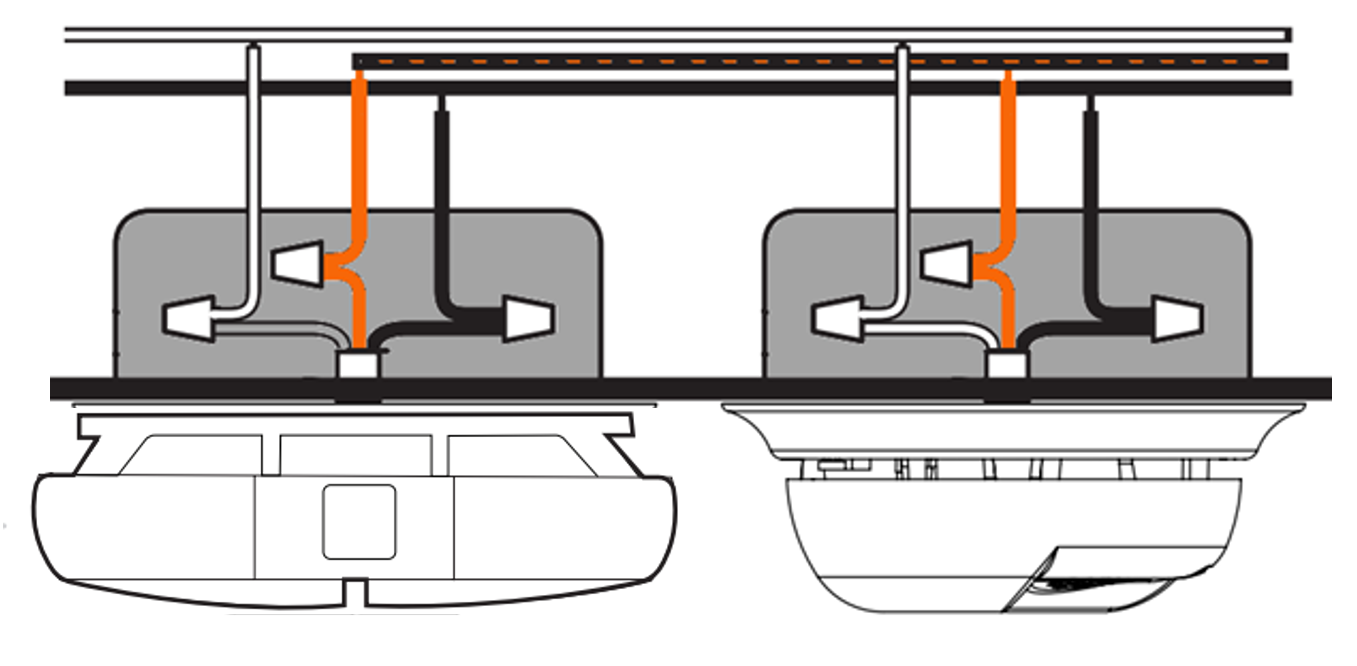
You can Interconnect your Hardwired SC5 (Model SMCO600NV-AC) to your other First Alert hardwired devices using the orange interconnect wire.
All modern First Alert, and BRK alarms use the same interconnect wiring, allowing them to work together seamlessly. You can also safely mix different types of hardwired detectors, such as installing a photoelectric smoke alarm near the kitchen and a heat detector by the garage.
Note: When the SC5 is hardwired to alarms that cannot be added to the First Alert or Google Home app, the app will still notify you if one of those detectors triggers a smoke or CO alarm. However, the alert will not include a room name because the interconnect wiring cannot identify which device activated the alarm. You also will not be able to silence all interconnected alarms from the app; you must locate the initiating alarm and manually silence it to stop all connected units.
*To comply with NFPA Standard 72, a maximum of 18 Initiating Alarms may be interconnected, no more than 12 of the 18 may be Smoke Alarms and 6 may be CO Detectors.
Related Articles
Understanding First Alert Smart Interconnect
Smoke and CO alarms produce different types of signals to trigger an alert. Smoke alarms and heat alarms send a constant 9VDC signal on the interconnect wire, while CO alarms send a pulsing 9VDC signal. Smart Interconnect is a feature that allows the ...First Alert SC5 Won't Connect to Wi-Fi
The First Alert SC5 needs to connect to your WiFi network. It supports both 2.4 GHz and 5 GHz networks, however there may be issues caused by the set up of your WiFi router or access point. Here are some suggestions to try to resolve the issue. I 1. ...How to Reset/Reboot the First Alert SC5 Smoke & CO Alarm
In many cases, common problems like false alerts or communication issues can be fixed by factory resetting the First Alert SC5 Smoke and Carbon Monoxide Alarm. The steps below also explain how to remove an SC5 device from your First Alert account. ...Guide to LED and Audible Alerts on Your First Alert/BRK Smoke & CO Detector
Smoke Detectors Model Normal Operation Alarm Condition Malfunction End of Life Low Battery 7010BA Steady Green. Flash Red. (1x every 5 min) Steady Green. Rapid Red. Audible Alarm. No LED. Horn: 3x No LED. Horn: 5x Flash Red. Horn: 1x 7020BSLA Steady ...Aeotec SmartThings Smart Home Hub vs Smart Home Hub 2: Comparison Guide
Aeotec Smart Home Hub (GP-AEOHUBV3US) The Aeotec SmartThings Smart Home Hub integrates a variety of smart devices through the SmartThings ecosystem, supporting Z-Wave, Zigbee 3.0, Wi-Fi, Matter and Thread. It serves as the central hub for managing ...